

How To Clean My Lenovo Ideapad 120s Hard Drive
iii Ways to Unlock BIOS (UEFI) Countersign on Lenovo ThinkPad Laptop

If y'all set a supervisor password on your BIOS setup, you will be prompted to enter this password before accessing BIOS setup settings. However, if y'all forgot BIOS password in Lenovo laptop, how to enter BIOS setup settings? How to reset or clear the forgotten password?
When y'all go problem with your laptop, you had better contact with the manufacture support and ask for their recommended methods to unlock your BIOS setup settings. Just as I meet in the official site of Lenovo laptop, they can't help to reset your BIOS password if you forgot the former countersign, they will recommend you to have the system lath replaced.
If the Lenovo Service Support can't help you to unlock your BIOS countersign, you tin can try with the methods below. Tin effort on Lenovo ThinkPad, IdeaPad, Yoga, and other series of Lenovo laptops.
- 3 ways to unlock bios password on lenovo laptop:
- Use the backstairs countersign
- Remove CMOS bombardment
- Short circuit SDA and SCL in security chip
Use the backdoor password
There is a backstairs countersign congenital-in to the BIOS by the manufacture. It is subconscious, so we tin can't see it ordinarily, but we can try to find it out on the master countersign site.
1. Power on laptop, press F1 fundamental to kicking upward BIOS entry screen.

2. On the password text box try with three passwords, if all these three passwords are incorrect, yous will exist blocked with the screen "Arrangement Disabled". And yous will get a code to become the backdoor countersign. Write this code downward.

3. Go to another computer with internet continued, open up this site: https://bios-pw.org/.
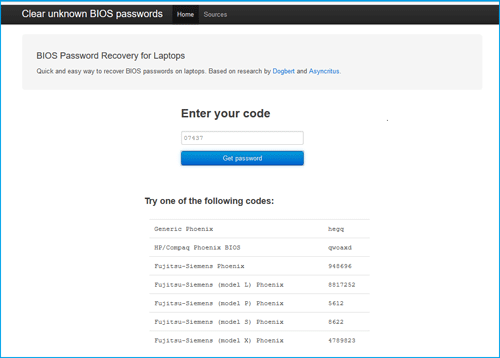
4. Enter the lawmaking y'all get on the Organization Disable screen and click on Go password.
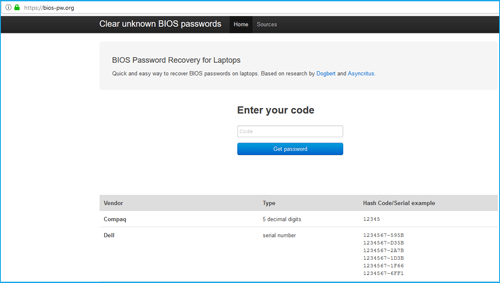
v. You volition get a list of passwords. Get to your laptop, restart it and press F1 key to boot to the BIOS entry screen again, and and then try with the list of passwords one past one. But you lot only be able to enter 3 incorrect passwords earlier your system is locked. Skillful luck with y'all!
If you tin't notice your backdoor password, try with the methods below.
Remove CMOS battery
one. Power off your Lenovo laptop, disconnect with the ability source, unplug all of the cables from laptop.
two. Remove the bombardment from laptop, and then remove the bottom of the laptop's case.
3. Find the CMOS battery, and remove the CMOS bombardment from laptop gently. This will reset BIOS settings to default settings, thereby clear BIOS password.

4. Wait for an hr, identify the CMOS battery dorsum in its slot once again, and reassemble laptop.
5. Plough on the laptop, printing F1 key repeatedly, you will become into Lenovo/ThinkPad BIOS settings without inbound password.
Short excursion SDA and SCL in security bit
1. Power off laptop, disconnect with the ability source, detach laptop. (Pay attention to the spiral model and location, y'all can take a photo with it. Or if the machine get together is completed, simply you find that there are even so a few small screws left, you volition take a headache.)
2. When disassemble the laptop, find the chip. It is on the back of the motherboard. Grasp the plastic frame and turn the motherboard over, you will run into it. Equally the motion picture below, the flake is in the scarlet circle.

iii. To short circuit the chip, y'all need to ability on and boot the laptop. So, after you lot detect the SCL and SDA, connect the hard drive, bombardment, keyboard, display screen, and the other basic components with laptop.
4. Connect with the power adapter and turn on laptop. As soon as the keyboard light is on, short circuit the SCL and SDA.

five. If information technology goes well, you will get into BIOS smoothly without asking password. If not, you will demand to endeavour several times.

vi. When get into BIOS settings, reset BIOS countersign. If it is unnecessary, you lot tin can disable the Supervisor Password on BIOS, in case, you forget BIOS password on your laptop once more.

7. At terminal, call back to press F10 to exit and salve the change.
8. Afterward your BIOS countersign is unlocked successfully, power off laptop, reassemble your laptop.
Related Articles
- Reset Bios Password on Asus Laptop/Desktop Computer
- Dell Inspiron/Latitude/Precision/Vostro laptop BIOS password reset
- How to remove power on password or BIOS countersign if forgot information technology
- Locked out of Windows vii Dwelling Premium how to unlock without password
- How to unlock a locked laptop without password on Windows 8
- Locked out of Windows ten laptop forgot password how to unlock

Source: https://www.cocosenor.com/articles/computer/3-ways-to-unlock-bios-password-on-lenovo-thinkpad-laptop.html
Posted by: cokleyaloons.blogspot.com
0 Response to "How To Clean My Lenovo Ideapad 120s Hard Drive"
Post a Comment